Enterprise agents that understand, converse and execute.
They handle payments, bookings, changes and inquiries directly in your systems, across digital channels as well as in branches and kiosks through hyper-realistic avatars.
The operating system for digital agents.
We analyze one of your processes and show you how an agent would resolve it in real time.
Stolen card, blocked in seconds.
- Bruno, a customer service agent, blocking a stolen card
- Identifies the holder with an SMS code.
- Blocks the stolen card instantly.
- Confirms with a case number.

Cancelled flight, rebooked on the spot.
- Mariana, a customer service agent, rebooking a cancelled flight
- Reports that the flight was cancelled.
- Offers three alternatives and books the chosen one.
- Issues the new pass with a QR code.
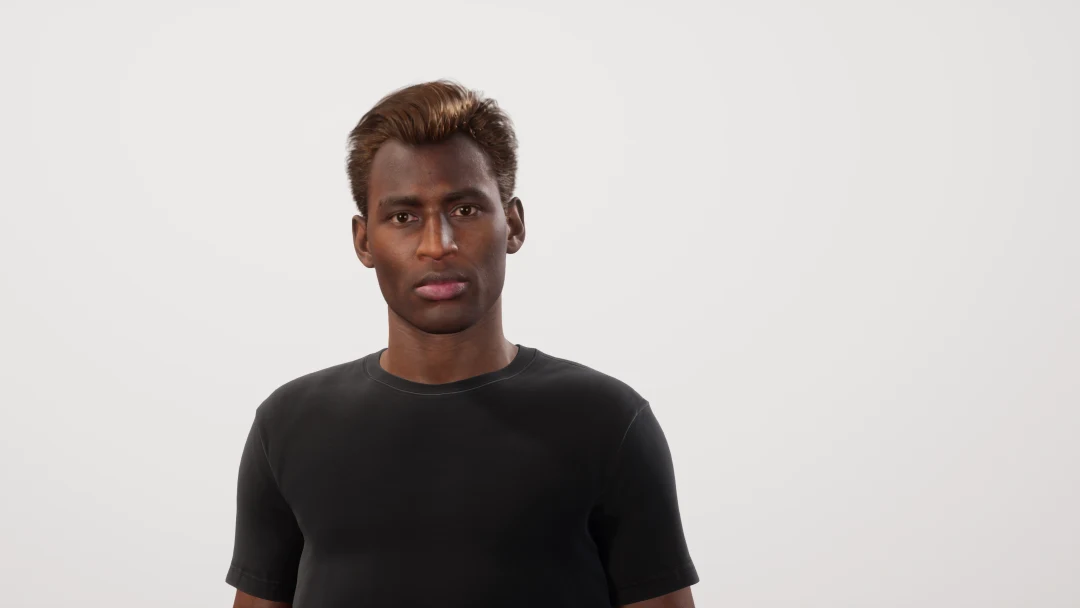
Internet down, fixed in one conversation.
- Diego, a customer service agent, fixing an internet outage
- Diagnoses the line: there is an outage in the area.
- Restarts the router remotely.
- Books the technician visit and sends a message.
Three operations, closed end to end.
The same agent finishes each one on chat, WhatsApp, voice or in a branch, inside the systems you already run.
Reactivate an account and collect
Authenticate the customer, show the balance, take a QR or link payment and turn the service back on.
Resolve an order, a return or a payment
Look up the product, the order or the return and finish it in the conversation. Accurate Fishing runs this for its customers.
Change a booking or an account detail
Find the appointment or the account and apply the change — a date, a plan, a detail — in the system you already run.
The new generation of MindLab agents.
Agents with a face, a voice and gestures that talk to your customers in real time, in their language. Meet Valentina, who runs a company's front desk.
From the request to the service back on.
How a real reactivation runs end to end: what happens in the conversation and what the agent executes inside your systems on chat, WhatsApp, voice or in a branch.
- Customer · In channel
“I need to reconnect my service and pay my overdue balance.”
The customer writes or speaks in their own words on WhatsApp, web chat, phone or a branch kiosk.
- Agent · Identity
Verifies the account holder and loads their context.
Recognizes their phone number or ID and authenticates them without asking them to repeat details.
- MCP / API · Live lookup
Checks the service status and exact balance in your system.
Reads the ERP, CRM or billing core you already run in real time, replacing nothing in your stack.
- Payment · In conversation
Generates a payment QR or link right inside the thread.
The customer pays the balance on the spot without leaving the channel or logging into an external portal.
- Your system · Execution
Confirms the payment and triggers the reconnection order.
As soon as the payment clears, the agent executes the reactivation directly in your core system.
- Agent → Customer · Closed
“Payment received. Your service is active again.”
Sends the receipt and closes the request in seconds, end to end and without human handoffs.

Companies already running on MindLab


Built with the leaders in AI

- OpenAI
- Google Gemini
- Anthropic
- Unreal Engine
- Three.js
- Socket.IO · real time
- SIP telephony
- WebRTC
- GitHub
- Terraform
- AWS
- Amazon EKS
- Self-hosted models
A complete solution with no provider dependency: cloud or self-hosted models.
 Meta ready
- GPT-Realtime ready
- Gemini Live ready
- MCP native
Your agents now answer WhatsApp calls.
Customers write or call from WhatsApp and the same agent resolves it, by chat or by real-time voice. Connect your number in minutes with Meta's Embedded Signup.

- Embedded Signup v4
- WhatsApp Calling
- OAuth
Inbound WhatsApp calls
The agent answers voice calls placed from WhatsApp, with the same context, tools and systems as the chat.
Connect with OAuth in minutes
Embedded Signup v4: sign in with Meta, choose the business and the number. No tokens to copy, no manual setup.
Phone numbers and user IDs
Each customer is recognized by phone number or by WhatsApp user ID, ready for customers who use a username instead of their number.
Everything synced with Meta
Business account, numbers, message templates and webhooks sync from Meta automatically.
Hear it answer a WhatsApp call
In the demo we walk through one of your processes on WhatsApp, by chat and by voice, connected to your systems.
A chatbot answers. MindLab resolves.
Most tools stop at the conversation. MindLab agents finish the job: in your systems, on every channel, including your branches.
| Capability | Typical chatbot | MindLab |
|---|---|---|
| Getting things done | Answers FAQs and hands off the rest | Executes payments, bookings and account changes in your systems through MCP and APIs |
| Your current systems | One more tool to maintain, disconnected from your stack | Connects to the ERP, CRM or e-commerce you already run, through MCP and APIs: it replaces nothing |
| Channels | Usually one or two channels, each with its own bot | Web, WhatsApp, Instagram, phone on Vonage and Telnyx, and the branch avatar: one agent, one memory |
| In-person service | Not available | Photorealistic MetaHuman avatar in branches and kiosks |
| AI models | Usually tied to one model | OpenAI, Google and Anthropic, chosen per agent, with no lock-in |
| Improvement | Manual tuning | Every interaction evaluated (LLM-as-judge) and improved continuously |
| Proof | Demos | In production: Celerity, with an avatar in its branches · −80% resolution time at Accurate Fishing |
MindLab's difference is simple: a better customer experience.

Why it is an operating system.
An agent needs a runtime: identity, memory, tools and the channels it shows up on. MindLab is that layer, on top of the systems you already run.
Identity
The agent verifies the customer against your systems before it acts.
Memory
One agent, one memory, on chat, WhatsApp, voice and in the branch.
Knowledge
Your documents, searched for that customer and isolated from every other tenant.
Tools
MCP and APIs into the ERP, CRM or commerce you already run.
Channels
Web, WhatsApp, phone on Vonage and Telnyx, and an optional branch avatar.
Voice
Real-time speech, with natural interruptions, in 29+ languages.
Vision
CP-Vision describes the scene on the customer's own machine.
Evaluation
Every interaction is scored, and the agent keeps improving.
Guardrails
A person stays in the loop when the decision is high-risk.
One agent for every front line.
Each avatar describes, in its own words, the job it does. Click any card to watch it with sound.

Sofía, in four kinds of cinema.
A 33-second short in which Sofía, a MindLab AI digital agent, introduces the platform. One take, one voice, four ways of looking at her. The film is narrated in Spanish, with captions.
Near-black background and a face sculpted with the brand's violet and fuchsia light, with bloom on the highlights.
33 s · Spanish with captions · plays only on demand
Omnichannel
The same case, on any channel.
Kiosk, web, WhatsApp (chat or call) or phone: the customer picks up where they left off and never repeats a thing.

“Your card is already blocked.”

Minutes to configure. A pilot to prove it.
Configure the first agent in minutes. Launch a pilot connected to your systems in 60–90 days.
Configure your agent
Personality, knowledge, voice and guardrails, from the dashboard. That part takes minutes.
Connect your systems and channels
Connect the systems you already run, and the channels you choose: chat, WhatsApp, voice or a branch. A branch avatar is optional.
Launch the pilot
One process, one channel, connected to your systems. In 60–90 days you know what it delivers.
Don't take our word for it. Talk to our agent.
The same MindLab agent answers on this website and on WhatsApp. Tell it about your operation, ask anything, and book your demo right in the conversation.
Web chat
Open the chat on this page and ask how MindLab would handle your customers.
WhatsApp
Message the same agent from your phone, with the same knowledge and memory.
Open WhatsAppPhone
The same agent takes calls on Vonage and Telnyx, with natural interruptions.
See the voice lineBranch avatar
See the photorealistic avatar that serves customers in branches and kiosks.
See the branch avatar
Ask the agent
Available 24/7
Celerity: an AI avatar in its branches.
A real MindLab deployment: a hyper-realistic avatar in branch kiosks and digital channels.

Start with a pilot. Scale with data.
One process, one channel, success metrics agreed up front. In 60–90 days you know exactly what MindLab delivers for your operation.
- Discovery: use cases, systems and success metrics
- Go-live on one channel, connected to your systems
- Measure and decide: scale, adjust or stop
Your volumes, your handle time, your staff cost. The page shows every formula. The result is an estimate, not a quote.
There is no public price. A pilot is quoted after discovery, from your channels and the systems we connect.
The art behind the agents.
Frames and faces: MindLab's concept art gallery.



Latest from MindLab
Insights on AI, digital agents, and the future of customer experience.
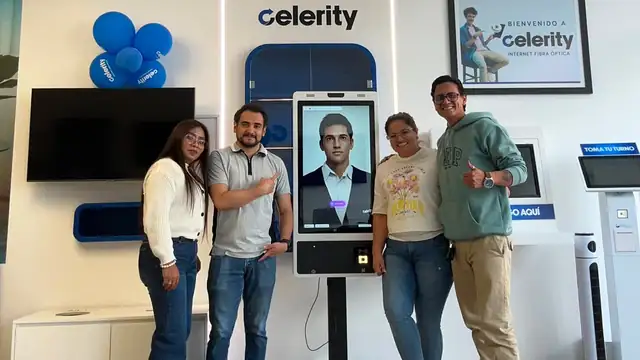
How Celerity Reduced Branch Workload with a Self-Service AI Avatar
From long queues to instant, human-like service across physical and digital channels
Apr 11, 2026
How Accurate Fishing Reduced Customer Resolution Time by 80% with AI Agents
Accurate Fishing transformed its customer experience using specialized AI agents that collaborate in real time to solve complex requests—reducing resolution time by 80% and eliminating human bottlenecks.
Apr 11, 2026